
Dan Kennedy
New Member
Hello,
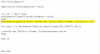
I am hoping somebody can help me with some VBA code. I posted this question about a week ago on another board but have not gotten a lot of suggestions. In the attached workbook I have a filter set up on the first page in column I5. I would like to set this up so that it looks at a column on each page - for example the T4 Tower page and filters that column based on the selection made on the first page in I5. I am not a VBA wizard but this is what I started with. In the full worksheet there are 8 or more separate pages to filter, but I am thinking I may be able to just filter the data on the T4 Tower page and get what I need. Also it may be easier if all the filtering criteria for example, in column CR on the T4 Tower page, were all in the same column. I have a workbook I could send to somebody but I can't get it small enough to post here. If somebody can help and private message me then I could email it to you.
If anybody has a way to do this I would really appreciate the help.
Thank you,
Dan
I am hoping somebody can help me with some VBA code. I posted this question about a week ago on another board but have not gotten a lot of suggestions. In the attached workbook I have a filter set up on the first page in column I5. I would like to set this up so that it looks at a column on each page - for example the T4 Tower page and filters that column based on the selection made on the first page in I5. I am not a VBA wizard but this is what I started with. In the full worksheet there are 8 or more separate pages to filter, but I am thinking I may be able to just filter the data on the T4 Tower page and get what I need. Also it may be easier if all the filtering criteria for example, in column CR on the T4 Tower page, were all in the same column. I have a workbook I could send to somebody but I can't get it small enough to post here. If somebody can help and private message me then I could email it to you.
If anybody has a way to do this I would really appreciate the help.
Thank you,
Dan