• Hi All

    Please note that at the Chandoo.org Forums there is Zero Tolerance to Spam

    Post Spam and you Will Be Deleted as a User

    Hui...

  • When starting a new post, to receive a quicker and more targeted answer, Please include a sample file in the initial post.

Search solution

job101

New Member
I have a list of 11,000 horses, their sires and ratings.
I would like a search formula that will return a query to the "Selections" box.
The process would be repeated upto 10 times, but I don't want to overwrite
the selection, I want each query listed individually in the "Selections" box.
I'm quite useless with Excel, as I know this is a very simple formula
HELP, PLEASE
 

Attachments

Last edited by a moderator:
Did You test Your previous threads replies?

Could You show
> How would You use this with few samples with Your given data?
> How to show expected valid results?
 
Last edited:
Did You test Your previous threads replies?

Could You show
> How would You use this with few samples with Your given data?
> How to show expected valid results?
Hi
thanks for your reply.
As I stated, I am really useless at anything other than makeing a list.
But a there are more than 11,000 horses, in fact it's closer to 16,000 horses, spread over 20 worksheets
so for me to find 1 horse from them takes forever.
I was looking for a solution, which I know would be very easy for someone who knows what they are doing
which I certainly DO NOT
 

job101

Your previous thread has ... many worksheets ... Your the latest file has one worksheet.
Did You comment someway - did You test previous threads replies?
Did You notice my other questions?
Could You show
> How would You use this with few samples with Your given data?
> How to show expected valid results?

You should able to show someway - how to use Your file?
... if Your point is to find 1 horse ... so far I could show - how to get it by random.
How would You do this manually?
 

job101

Your previous thread has ... many worksheets ... Your the latest file has one worksheet.
Did You comment someway - did You test previous threads replies?
Did You notice my other questions?
Could You show
> How would You use this with few samples with Your given data?
> How to show expected valid results?

You should able to show someway - how to use Your file?
... if Your point is to find 1 horse ... so far I could show - how to get it by random.
How would You do this manually?
Your's was the only reply and I tried to use it but kept getting an error, I probably put wrong cell numbers in and don't know how to rectify it
I thought that showing just a small selection was better than the entire list, As all I would have to do was change the cell numbers.
As I like to gamble on the horses, the "RACES" column, is the result of a horses performance for every race they have run.
To assess another race, at present I use the "FIND" for a specific horse, then copy the result across to my selection box, then repeat the "FIND"
for as many times, up to 10 runners, if required.
My current method takes too long, but seeing as I have very little understanding of "FORMULAS", I was hoping someone on CHANDOO would be able to make my life a little easier.
Sorry, but I don't know how to answer your second question
 
So far, I've only asked questions.

Your file Races-column looks 'wild' for others.
To assess another race, at present I use the "FIND" for a specific horse, then copy the result across to my selection box, then repeat the "FIND"
for as many times, up to 10 runners, if required.


Your written FINDing... with Your the latest given data
Horse-column names looks to be unique ... then there could be only one horse ... bonus - one Sire has same name.
Sire-column ... there are duplicates ... then there could FIND more than one horse.
Races-column ... there is one duplicate #52 & #87 ... which means that there could be more than one horse.
Above means for me: You could find one or two rows.
Did You write so? Did You mean that?

My How would You do this manually?
... like 'old way' with paper and pencil.
 
Code:
Option Explicit

Private Sub Worksheet_Change(ByVal Target As Range)
    Dim i           As Long
    Dim found       As Boolean

    If Intersect(Target, Me.Range("I5:I14")) Is Nothing Then Exit Sub
    If Target.CountLarge > 1 Then Exit Sub

    If Target.Value = "" Then
        Me.Range("J" & Target.Row & ":K" & Target.Row).ClearContents
        Exit Sub
    End If

    Dim searchValue As String
    searchValue = CStr(Target.Value)

    Dim lastRow     As Long
    lastRow = Me.Cells(Me.Rows.Count, "B").End(xlUp).Row
    If lastRow < 2 Then Exit Sub

    Dim dataArr     As Variant
    dataArr = Me.Range("B2:D" & lastRow).Value

    Me.Range("J" & Target.Row & ":K" & Target.Row).ClearContents

    For i = 1 To UBound(dataArr, 1)

        If CStr(dataArr(i, 1)) = searchValue Then
            Me.Cells(Target.Row, "J").Value = dataArr(i, 2)
            Me.Cells(Target.Row, "K").Value = dataArr(i, 3)

            found = True
            Exit For
        End If

    Next i

    If Not found Then
        Me.Cells(Target.Row, "J").Resize(1, 2).Value = "No matches"
    End If

End Sub
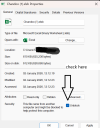
For the example file provided in this thread. I've attached my example below. Enter the horse name you're looking for in the "I" column and get the result next to it.
 

Attachments

Code:
Option Explicit

Private Sub Worksheet_Change(ByVal Target As Range)
    Dim i           As Long
    Dim found       As Boolean

    If Intersect(Target, Me.Range("I5:I14")) Is Nothing Then Exit Sub
    If Target.CountLarge > 1 Then Exit Sub

    If Target.Value = "" Then
        Me.Range("J" & Target.Row & ":K" & Target.Row).ClearContents
        Exit Sub
    End If

    Dim searchValue As String
    searchValue = CStr(Target.Value)

    Dim lastRow     As Long
    lastRow = Me.Cells(Me.Rows.Count, "B").End(xlUp).Row
    If lastRow < 2 Then Exit Sub

    Dim dataArr     As Variant
    dataArr = Me.Range("B2:D" & lastRow).Value

    Me.Range("J" & Target.Row & ":K" & Target.Row).ClearContents

    For i = 1 To UBound(dataArr, 1)

        If CStr(dataArr(i, 1)) = searchValue Then
            Me.Cells(Target.Row, "J").Value = dataArr(i, 2)
            Me.Cells(Target.Row, "K").Value = dataArr(i, 3)

            found = True
            Exit For
        End If

    Next i

    If Not found Then
        Me.Cells(Target.Row, "J").Resize(1, 2).Value = "No matches"
    End If

End Sub
For the example file provided in this thread. I've attached my example below. Enter the horse name you're looking for in the "I" column and get the result next to it.
Hi, thats it just what I am looking for. Just one problem how do I get it to run on my worksheet and would I have to alter anything because it would be going on to a larger list?
 

job101,​

Have you (forgive me) looked at my file? There's no need to run anything manually. The code automatically runs when you enter the desired horse name in the range I5:I14. The main thing is that the source data is in the range B:D; the size of your list doesn't matter. Read it.
 

job101,​

Have you (forgive me) looked at my file? There's no need to run anything manually. The code automatically runs when you enter the desired horse name in the range I5:I14. The main thing is that the source data is in the range B:D; the size of your list doesn't matter. Read it.
Hi
your solution is perfect, it does exactly what I wanted. I am just a little confused (really don't know what I am doing in Excel,)as to where I insert the code on my worksheet
 

job101

You've asked Formula-solution.
But - if You still would like to have many sheets with Your worksheet like Your Chandoo.xlsx -file (Your previous thread)
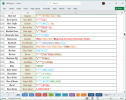
You could get Your horses detail something like this sample file.
I found that You've used Sheet2.
Modify Your (as many as needed) horses and press [ Do It ]-button.
 

Attachments

Back
Top