Falinaicare
Member
Dear Expert,
Good day.
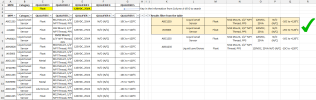
I have a table with a large number of rows, which can make it difficult to navigate and interpret the data.
Is there a way for a user to enter values into specific cells so that the table automatically filters and displays only the records that match all the entered attributes?
If the entered attributes do not match any records, the system should display a “No record found” message.
Hope to hear from you.
Thanks.
Good day.
I have a table with a large number of rows, which can make it difficult to navigate and interpret the data.
Is there a way for a user to enter values into specific cells so that the table automatically filters and displays only the records that match all the entered attributes?
If the entered attributes do not match any records, the system should display a “No record found” message.
Hope to hear from you.
Thanks.