
You are using an out of date browser. It may not display this or other websites correctly.
You should upgrade or use an alternative browser.
You should upgrade or use an alternative browser.
Equation correction
- Thread starter Mamdouh Elfors
- Start date

Mamdouh Elfors
Member
The first table is made in a lengthy way because I am searching for the item in the reports sheet because it always changes the locations of the items. This takes a long time and makes a lot of mistakesWhat is the difference between those tables? Why search other solutions when the one you have in Table 1 seem to work fine?
Also, the report sheet contains a lot of data, and what is presented now is just a sample
I'm trying to make another table with equations that shorten the time and effort and protect me from mistakes
thank you
Since your 3 source tables header are in different order in compare with the summary table header
You can't use a single Sumif function to summarized 3 tables quantities.
You need 3 separated Sumif functions to do the job, something like this :
In D18, formula copied across right and down :
=IFERROR(SUMIF(Reports!$B$19:$B$32,$B18,INDEX(Reports!$D$19:$P$19,MATCH(D$17,Reports!$D$18:$P$18,0))),0)+IFERROR(SUMIF(Reports!$B$62:$B$75,$B18,INDEX(Reports!$D$62:$P$62,MATCH(D$17,Reports!$D$61:$P$61,0))),0)+IFERROR(SUMIF(Reports!$B$105:$B$118,$B18,INDEX(Reports!$D$105:$P$105,MATCH(D$17,Reports!$D$104:$P$104,0))),0)
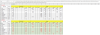
You can't use a single Sumif function to summarized 3 tables quantities.
You need 3 separated Sumif functions to do the job, something like this :
In D18, formula copied across right and down :
=IFERROR(SUMIF(Reports!$B$19:$B$32,$B18,INDEX(Reports!$D$19:$P$19,MATCH(D$17,Reports!$D$18:$P$18,0))),0)+IFERROR(SUMIF(Reports!$B$62:$B$75,$B18,INDEX(Reports!$D$62:$P$62,MATCH(D$17,Reports!$D$61:$P$61,0))),0)+IFERROR(SUMIF(Reports!$B$105:$B$118,$B18,INDEX(Reports!$D$105:$P$105,MATCH(D$17,Reports!$D$104:$P$104,0))),0)

p45cal
Well-Known Member
@bosco_yip has pointed out that your headers in the Reports sheet on rows 18, 61 and 104 are not in the same order.
But worse, they're more dissimilar with the order on row 31 of the Total Table sheet which you're using to decide which column to sum.
I've hidden all but the header rows on your Reports sheet and added row 31 from the Total Table sheet to demonstrate this.
bosco has given you a formula with several hard-coded ranges which will need to be updated should more tables exist on the Reports sheet.
I was thinking of having the dates of each table in their top right area and we could use that to find the correct row column headers on the Reports sheet dynamically. Well, I started but gave up!
Instead I went the Power Query route. I grab the whole table on the Reports sheet from row 2 to row 129.
[I've made a copy of your Reports sheet to avoid messing it up; I've worked from the Reports (2) sheet.]
Inside Power Query I then look or the dates in column B and assume the rows between dates are the individual tables.
Then within each of those tables I look for Herd Types and Cows vaccinated in the first column and assume all the data you need is between those rows. I then did some further manipulation to make them more or less like your tables in columns B:R on the Total Table sheet.
The result I put at cell T2 of the Total Table. If you change the data in the Reports (2) sheet, you'll need to right-click this table and choose Refresh to update it.
It's not very flexible but it might do.
While on a roll I decided you might want something more flexible, so I created a second Power Query which delivers its results to a pivot table which I've put at cell AJ2 of the Total Table sheet. Because it's a pivot table, you can tailor its output to suit you in very many different ways. Even grouping your Herd Types in the same way as on your Reports sheet to obtain their subtotals.
My two output tables agree with each other (but you'd expect that since they use the same way of fetching the data in the first place), but they don't agree with bosco's picture. You'll need to check.
You should be able to add further reports to the Reports sheet, if they're in the same format as the existing 3. It should cope with different feed types and different feeds. Just make sure they're fully encompassed by the table extents of Table1. Of course you'll need to Refresh both the pivot table and the table at T2.
But worse, they're more dissimilar with the order on row 31 of the Total Table sheet which you're using to decide which column to sum.
I've hidden all but the header rows on your Reports sheet and added row 31 from the Total Table sheet to demonstrate this.
bosco has given you a formula with several hard-coded ranges which will need to be updated should more tables exist on the Reports sheet.
I was thinking of having the dates of each table in their top right area and we could use that to find the correct row column headers on the Reports sheet dynamically. Well, I started but gave up!
Instead I went the Power Query route. I grab the whole table on the Reports sheet from row 2 to row 129.
[I've made a copy of your Reports sheet to avoid messing it up; I've worked from the Reports (2) sheet.]
Inside Power Query I then look or the dates in column B and assume the rows between dates are the individual tables.
Then within each of those tables I look for Herd Types and Cows vaccinated in the first column and assume all the data you need is between those rows. I then did some further manipulation to make them more or less like your tables in columns B:R on the Total Table sheet.
The result I put at cell T2 of the Total Table. If you change the data in the Reports (2) sheet, you'll need to right-click this table and choose Refresh to update it.
It's not very flexible but it might do.
While on a roll I decided you might want something more flexible, so I created a second Power Query which delivers its results to a pivot table which I've put at cell AJ2 of the Total Table sheet. Because it's a pivot table, you can tailor its output to suit you in very many different ways. Even grouping your Herd Types in the same way as on your Reports sheet to obtain their subtotals.
My two output tables agree with each other (but you'd expect that since they use the same way of fetching the data in the first place), but they don't agree with bosco's picture. You'll need to check.
You should be able to add further reports to the Reports sheet, if they're in the same format as the existing 3. It should cope with different feed types and different feeds. Just make sure they're fully encompassed by the table extents of Table1. Of course you'll need to Refresh both the pivot table and the table at T2.
Attachments
Last edited: