Dear Team,
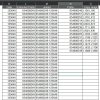
There are 15000 entries in column K and there are set of predefined prefix in column N also range of cell to be filled with prefix located in column O. Help me to create a macro to copy and paste the prefix data (one prefix will be copied in to range mentioned in the next column) . Once prefix located in column L prefix value to be joined with column L value with space separator.
Thanks & Best Rgds,
nbuddhi.
There are 15000 entries in column K and there are set of predefined prefix in column N also range of cell to be filled with prefix located in column O. Help me to create a macro to copy and paste the prefix data (one prefix will be copied in to range mentioned in the next column) . Once prefix located in column L prefix value to be joined with column L value with space separator.
Thanks & Best Rgds,
nbuddhi.