

You are using an out of date browser. It may not display this or other websites correctly.
You should upgrade or use an alternative browser.
You should upgrade or use an alternative browser.
Cluster Data to Single Table
- Thread starter Vignesh Veerasamy
- Start date

Peter Bartholomew
Well-Known Member
Basically, it appears that you wish to filter the 'Revision Level's by Object/part and transpose the resulting column,
Something I do not understand is where revision level "B" has gone.
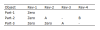
To return the entire table as a single 365 spilt range is insanely difficult and I would not recommend it unless you are in to heavy programming (and have access to the latest versions of 365).
Code:
Part
= UNIQUE(Object);

= TRANSPOSE(FILTER(Revision_Level, Object=@Part))To return the entire table as a single 365 spilt range is insanely difficult and I would not recommend it unless you are in to heavy programming (and have access to the latest versions of 365).
Code:
= LET(
      part,      UNIQUE(Object),
      revisonsϑ, MAP(UNIQUE(Object), LAMBDA(p,
         LET(
            matches,  Object=p,
            partRevs, FILTER(Revision_Level, matches),
            LAMBDA(TRANSPOSE(partRevs))
         )
      )),
      revArr,   REDUCE(hdr, revisonsϑ, LAMBDA(a,ϑ, VSTACK(a,ϑ() ))),
      partHdr,  VSTACK("Object",part),
      revTable, HSTACK(partHdr, revArr),
      IF(ISERROR(revTable), "", IF(revTable=0,"Zero",revTable))
   )
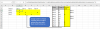
Attachments
Vignesh Veerasamy
Member
OOps sorry my bad i missed "B" will this code work in MS Office excel?Basically, it appears that you wish to filter the 'Revision Level's by Object/part and transpose the resulting column,
Something I do not understand is where revision level "B" has gone.Code:Part = UNIQUE(Object); = TRANSPOSE(FILTER(Revision_Level, Object=@Part))
View attachment 80475
To return the entire table as a single 365 spilt range is insanely difficult and I would not recommend it unless you are in to heavy programming (and have access to the latest versions of 365).
Code:= LET( part, UNIQUE(Object), revisonsϑ, MAP(UNIQUE(Object), LAMBDA(p, LET( matches, Object=p, partRevs, FILTER(Revision_Level, matches), LAMBDA(TRANSPOSE(partRevs)) ) )), revArr, REDUCE(hdr, revisonsϑ, LAMBDA(a,ϑ, VSTACK(a,ϑ() ))), partHdr, VSTACK("Object",part), revTable, HSTACK(partHdr, revArr), IF(ISERROR(revTable), "", IF(revTable=0,"Zero",revTable)) )
Peter Bartholomew
Well-Known Member
It only works with Excel 365 and Excel 2021. Moving to 365 was a positive decision for me because I dislike traditional spreadsheet methods. That said, there are members of this forum that are absolutely superb in what they can achieve using traditional spreadsheet techniques. In the present case, @bosco_yip 's solution will work with older versions of Excel. A custom number format can be used to display the '0's as 'Zero'sOOps sorry my bad i missed "B" will this code work in MS Office excel?