Hi All,
I have written macro code to open last modified file from folder; It was working fine. 3 times i test-run it.
My concern is , why "strFilename" storing "Thumbs.db" file instead of last modified file excel file?
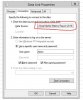
But all of sudden it started giving me Data Link Properties dialog box while opening excel file from a drive.
attached is the screenshot.
below is my code i have written to open last modifed file:
mydir = "N:\L'Oreal\Kiehls\Metrics Report\2016\"
Set FileSys = New FileSystemObject
Set myFolder = FileSys.GetFolder(mydir)
dteFile = DateSerial(1900, 1, 1)
For Each objFile In myFolder.Files
If objFile.DateLastModified > dteFile Then
dteFile = objFile.DateLastModified
strFilename = objFile.Name
End If
Next objFile
Workbooks.Open mydir & strFilename, UpdateLinks:=3
Please help!
Regards,
Mahantesh
I have written macro code to open last modified file from folder; It was working fine. 3 times i test-run it.
My concern is , why "strFilename" storing "Thumbs.db" file instead of last modified file excel file?
But all of sudden it started giving me Data Link Properties dialog box while opening excel file from a drive.
attached is the screenshot.
below is my code i have written to open last modifed file:
mydir = "N:\L'Oreal\Kiehls\Metrics Report\2016\"
Set FileSys = New FileSystemObject
Set myFolder = FileSys.GetFolder(mydir)
dteFile = DateSerial(1900, 1, 1)
For Each objFile In myFolder.Files
If objFile.DateLastModified > dteFile Then
dteFile = objFile.DateLastModified
strFilename = objFile.Name
End If
Next objFile
Workbooks.Open mydir & strFilename, UpdateLinks:=3
Please help!
Regards,
Mahantesh