
Hello,
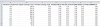
I am need of some help creating a payroll summary sheet. I need to summarize numbers (in one cell) for vacation, holiday, and bonus if an employee works in dept 100,125, or 175. I tried using sumif for each column but it became too lengthy. (i have a ton of departments and simplified this example)
Is there a way to simply write "sum corresponding values in e f & g when you see 100,125 or 175 in column "a""???
Please help!!!
I am need of some help creating a payroll summary sheet. I need to summarize numbers (in one cell) for vacation, holiday, and bonus if an employee works in dept 100,125, or 175. I tried using sumif for each column but it became too lengthy. (i have a ton of departments and simplified this example)
Is there a way to simply write "sum corresponding values in e f & g when you see 100,125 or 175 in column "a""???
Please help!!!

