• Hi All

    Please note that at the Chandoo.org Forums there is Zero Tolerance to Spam

    Post Spam and you Will Be Deleted as a User

    Hui...

  • When starting a new post, to receive a quicker and more targeted answer, Please include a sample file in the initial post.

Sort the Data with Repeated Records (with formulas only)

MSO_user

New Member
Dear Friends


Assalamualiqum.....Brother....Hopping for your better health and safety....


Please note that I have some data in excel which is produced by software....
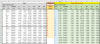
I have to Filter and Arrange the data as shown in Input table present in Excel File attachment...
It is requested to kindly use formulas and produce the Output table shown. (please use formulas, it will help me in learning Excel)


Although, I can use Filter options with selected results form the column, but I request if formulas can be used...
I have tried to using INDEX, MATCH, ROW, COUNTIF but I am unable to produce the required results...
I am unable to make a logic about sorting, filtering and arranging the data as per output table...


Please note that I have Excel 2013.....i.e. please avoid array formulas SORT, UNIQUE & FILTER....I have to share the sheet with other fellows as well.


Thanks
 

Attachments

Dear Michael Gramm

Much Thanks for your input....the response is much better. But, please note following.

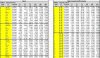
1) "Joint" & "LC" in Input Table....should also be arranged as per Output Table......Please refer the picture attachment....

82338

I have tried using INDEX, MATCH, ROW, COUNTIF but I am unable to produce the required results...

I think I missed the above explanation in the original threads......Sorry from my side....

Please, provide your response, it will help me a lot.....

Yours Sincerely
 
RT, UNIQUE & FILTER....I have to
Hi,

In order to not use a long formula, I suggest using helper cell and helper column method in shorten formula as in:

This formula way suit with your Excel 2013, Excel beginner and also avoid using array formula.

1] In Helper cell J2, enter formula:

=SUMPRODUCT(1/COUNTIF($A$5:$A$164,$A$5:$A$164))*SUMPRODUCT(1/COUNTIF($B$5:$B$164,$B$5:$B$164))

2] In Helper column J5, formula copied down:

=IFERROR(INDEX(A$5:A$164, MATCH(0,COUNTIF(J$4:J4, A$5:A$164&""), 0)),"")

3] In Result column K5, formula copied down:

=IF(ROW($A1)<=$J$2,INDEX($J$5:$J$50,MOD(ROW(A1)-1,SUMPRODUCT(1/COUNTIF($A$5:$A$164,$A$5:$A$164)))+1),"")

4] In Result column L5, formula copied across and down:

=IF($K5="","",INDEX($A$5:$I$164,AGGREGATE(15,6,ROW($J$5:$J$164)-ROW($J$4)/($A$5:$I$164=$K5),COUNTIF($K$5:$K5,$K5)),MATCH(L$3,$A$3:$I$3,0)))

5] Hide Helper column or set the Helper column font color as same as the background color.

82340
 

Attachments

Last edited:
Dear Brother bosco_yip

Much Much Thanks....My query is solved....

In order to understand it......I need more time....But Brother.....Your efforts are much appreciated....

Any ways one last request......If possible.....I am asking too much....But just a test run....

For Example, if I remove a record of any "Joint No." let say....."3".....

The Formulae shows error.....please refer the snap.....

82351

I will try my best to try over come this error.....myself....

Please, Please brother.....Much Thanks.....If it error is avoidable....then it is a miracle...

No.....issues.....If it takes more time.....but I am happy that I have reached this far....

Please, Tell me What I can do to support you brother!!!!

Much Thanks....For Your Support....
 
Dear Brother bosco_yip

Much Much Thanks....My query is solved....

In order to understand it......I need more time....But Brother.....Your efforts are much appreciated....

Any ways one last request......If possible.....I am asking too much....But just a test run....

For Example, if I remove a record of any "Joint No." let say....."3".....

The Formulae shows error.....please refer the snap.....

View attachment 82351

I will try my best to try over come this error.....myself....

Please, Please brother.....Much Thanks.....If it error is avoidable....then it is a miracle...

No.....issues.....If it takes more time.....but I am happy that I have reached this far....

Please, Tell me What I can do to support you brother!!!!

Much Thanks....For Your Support....
If you remove "3" in your record, try this revised formula instead.

1] In Helper cell J2, enter revised formula:

=ROUND(SUMPRODUCT(($A$5:$A$164<>"")/COUNTIF($A$5:$A$164,$A$5:$A$164&""))*SUMPRODUCT(($A$5:$A$164<>"")/COUNTIF($B$5:$B$164,$B$5:$B$164&"")),0)

remark:
1.1) the adding of ($A$5:$A$164<>"") and &"" are to avoid data blank.

1.2) the adding of ROUND function "ROUND(......,0)" is to avoid the floating-point number. (Without Round function, the result will give 149.9999..., not150 as expected), try to google "Excel floating point problem" for further understand.

2] In Result column K5, revised formula copied down:

=IF(ROW($A1)<=$J$2,INDEX($J$5:$J$50,MOD(ROW(A1)-1,SUMPRODUCT(($A$5:$A$164<>"")/COUNTIF($A$5:$A$164,$A$5:$A$164&"")))+1),"")


82354
 

Attachments

Dear Brother @bosco_yip

Much Much Thanks Brother.....

Know Brother.....I Pray that God helps in future careers, Your stay healthy and happy with your family and friends.....And when ever your feel sadness....then God helps......Ameen Summ Ameen...

Brother....you have done alot to me.....Know it is my turn....

Please....I can be of any service to you.....Brother.....!!!!!!!

Yours Sincerely
 
Back
Top