

Bella Jeon0815
New Member
Dear Guru & Experts,
I have a problem with Conditional Formatting, using Small or Large function.
I'd like to compare and high light only certain cell / column to compare.
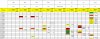
For instance, I'd like to only see the smallest and 2nd smallest price from my list using different color. but the range is not next each other.
Current conditional Formatting Formular is like below,
=C7=SMALL(IF($C7:$AG7>0,$C7:$AG7),1)
=C7=SMALL(IF($C7:$AG7>0,$C7:$AG7),2)
=C7=SMALL(IF($C7:$AG7>0,$C7:$AG7),3) .....
But I only want to compare the price columns in the sheet not q'ty or total spend.
How can I formulate right conditional formatting formular ?
Please Advise me !!!
=C7=SMALL(IF($C7:$AG7>0,$C7:$AG7),6)
I have a problem with Conditional Formatting, using Small or Large function.
I'd like to compare and high light only certain cell / column to compare.
For instance, I'd like to only see the smallest and 2nd smallest price from my list using different color. but the range is not next each other.
Current conditional Formatting Formular is like below,
=C7=SMALL(IF($C7:$AG7>0,$C7:$AG7),1)
=C7=SMALL(IF($C7:$AG7>0,$C7:$AG7),2)
=C7=SMALL(IF($C7:$AG7>0,$C7:$AG7),3) .....
But I only want to compare the price columns in the sheet not q'ty or total spend.
How can I formulate right conditional formatting formular ?
Please Advise me !!!
=C7=SMALL(IF($C7:$AG7>0,$C7:$AG7),6)
