
• Hi All

    Please note that at the Chandoo.org Forums there is Zero Tolerance to Spam

    Post Spam and you Will Be Deleted as a User

    Hui...

  • When starting a new post, to receive a quicker and more targeted answer, Please include a sample file in the initial post.

Show content of list based on cell selected

Ronald

Member
Hi all,

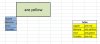
I'm wondering if there is an easy way to achieve the following (please see attached picture):

I want the green block to show the details from the yellow table depending on which cell I click (mouse) on the blue list.
In this example I put my cursor on 'Banana' on the blue list, that should update the green box depending on the values as in the yellow table. In this case: 'are yellow'.
The green box shoud be updated to 'are green' when I click on 'Kiwi'.

Any suggestion?
 

Attachments

  • test_excel.jpg
    test_excel.jpg
    18 KB · Views: 16
Yeah that is right vba. It is uber cool that you did not supply that dummy data in the form of an XL file. It means the members have to develop a model when you have one in front of you. Pictures are no substitute. Please consider this in future as we all win. Thanks mate

Code:
Option Explicit
 
Private Sub Worksheet_SelectionChange(ByVal Target As Range)
    If Not Intersect(Target, Range("A5:A8")) Is Nothing Then
        [c4] = Target& "'s " & Application.VLookup(target, [F5:G8], 2, 0)
    End If
End Sub

File to show workings. As a suggestion you could apply conditional formatting to match the colour of the selection.

Take care

Smallman
 

Attachments

Thanks so much Ronald that is awsome!!! :)

I have posted a file. I usually drop the code then the file. Hope the file helps you.

Smallman

Edit - I have just looked at your file you should smash it when you see my file so I won't post an update.
 
Hi Smallman,

You beat me to it Mate, however, I think we should remind the reader that this snippet is a Worksheet code and should be placed in respective Worksheet.

cheers
kanti
 
Thanks so much Ronald that is awsome!!! :)

I have posted a file. I usually drop the code then the file. Hope the file helps you.

Smallman

Edit - I have just looked at your file you should smash it when you see my file so I won't post an update.

Great!

I't clear & working. Thanks!
 
Hi Kchiba

If you follow this forum closely you will see I mostly provide a file and code. This takes away a lot of confusion. It seems Ronald is switched on as he got it working in his own file very quickly.

Ronald

Good man well done.

Smallman
 
Eh, may I please ask a last question about this?
It returns a runtime error 13/Type mismatch when the range, in this example (A5:A8), has a blank cell.
Is there any was to supress an error message when not found or to set the target cell to blank?
 
Hi Ronald

Go with something like this for a bit of spice in your life.

Code:
Private Sub Worksheet_SelectionChange(ByVal Target As Range)
    On Error GoTo pitythefool
    If Not Intersect(Target, Range("A5:A8")) Is Nothing Then
        [c4] = Target & "'s " & Application.VLookup(Target, [F5:G8], 2, 0)
    End If
    Exit Sub
pitythefool:
[c4] = "Blanko Fat Boy!!!"
End Sub

Take care

Smallman
 
Back
Top