
sugarwhitesand
New Member
I am receiving duplicates and I cannot figure out why. I would also like the #N/A values to be blank, since I do need the formula down all of column C. You know, I might even be using the wrong formula!
What is my goal?
Below is the code for C9 (2nd picture)
Below is the code for C10 (2nd picture)
Thank you for your time and help! I greatly appreciate it!
What is my goal?
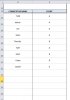
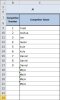
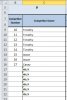
I have over 1,000 competitor names and each competitor will be placed into an 'Event' (picture 1). These 'Event' names are placed in cell B5 of each worksheet (shown in pictures 2 and 3), up to 40 total events (worksheets).
So, in the first picture, Todd (D14) is in Event A (E14). I need Todd's name to show up in C9 of the 2nd picture, which with my formula it has; but, if you look down the following cells of the 2nd picture and into the 3rd picture, the names start duplicating. Then, when there are no further competitor names for events A and B, I receive #N/A values; which I would like to remain blank.
So, in the first picture, Todd (D14) is in Event A (E14). I need Todd's name to show up in C9 of the 2nd picture, which with my formula it has; but, if you look down the following cells of the 2nd picture and into the 3rd picture, the names start duplicating. Then, when there are no further competitor names for events A and B, I receive #N/A values; which I would like to remain blank.
Below is the code for C9 (2nd picture)
Code:
=INDEX('COMPETITOR NAMES ~ DIVISIONS '!D14:E$1201,MATCH('(First Event) ~ MAIN WKSHT'!$B$5,'COMPETITOR NAMES ~ DIVISIONS '!E14:E$1201,0),1)Below is the code for C10 (2nd picture)
Code:
=INDEX('COMPETITOR NAMES ~ DIVISIONS '!D15:E$1201,MATCH('(First Event) ~ MAIN WKSHT'!$B$5,'COMPETITOR NAMES ~ DIVISIONS '!E15:E$1201,0),1)Thank you for your time and help! I greatly appreciate it!