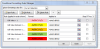
F febausa Member Apr 11, 2015 #1 I search some formula collects by categories I have attached example Thank you for your help. Attachments COLOR COUNT.xlsx COLOR COUNT.xlsx 10.2 KB · Views: 0
Hui Excel Ninja Staff member Apr 12, 2015 #2 It is very hard to access the colors of CF cells It is easier to replicate the logic of the CF in your Count or Sum formula B11: =SUMPRODUCT(--(INT((COLUMN($A$1:$BG$1)-0.1)/12)+1=ROWS($A$11:$A11))*($A$2:$BG$2>2.2)) C11: =SUMPRODUCT(--(INT((COLUMN($A$1:$BG$1)-0.1)/12)+1=ROWS($A$11:$A11))*($A$2:$BG$2>1.8)*($A$2:$BG$2<=2.2)) D11: =SUMPRODUCT(--(INT((COLUMN($A$1:$BG$1)-0.1)/12)+1=ROWS($A$11:$A11))*($A$2:$BG$2>1.4)*($A$2:$BG$2<=1.8)) E11: =SUMPRODUCT(--(INT((COLUMN($A$1:$BG$1)-0.1)/12)+1=ROWS($A$11:$A11))*($A$2:$BG$2>1)*($A$2:$BG$2<=1.4)) F11: =SUMPRODUCT(--(INT((COLUMN($A$1:$BG$1)-0.1)/12)+1=ROWS($A$11:$A11))*($A$2:$BG$2<=1)) Copy all down By the way F10 should say Pink, Not Blue See attached file: Attachments upload_2015-4-12_10-58-21.png 43.3 KB · Views: 0 COLOR COUNT.xlsx COLOR COUNT.xlsx 11.7 KB · Views: 0
It is very hard to access the colors of CF cells It is easier to replicate the logic of the CF in your Count or Sum formula B11: =SUMPRODUCT(--(INT((COLUMN($A$1:$BG$1)-0.1)/12)+1=ROWS($A$11:$A11))*($A$2:$BG$2>2.2)) C11: =SUMPRODUCT(--(INT((COLUMN($A$1:$BG$1)-0.1)/12)+1=ROWS($A$11:$A11))*($A$2:$BG$2>1.8)*($A$2:$BG$2<=2.2)) D11: =SUMPRODUCT(--(INT((COLUMN($A$1:$BG$1)-0.1)/12)+1=ROWS($A$11:$A11))*($A$2:$BG$2>1.4)*($A$2:$BG$2<=1.8)) E11: =SUMPRODUCT(--(INT((COLUMN($A$1:$BG$1)-0.1)/12)+1=ROWS($A$11:$A11))*($A$2:$BG$2>1)*($A$2:$BG$2<=1.4)) F11: =SUMPRODUCT(--(INT((COLUMN($A$1:$BG$1)-0.1)/12)+1=ROWS($A$11:$A11))*($A$2:$BG$2<=1)) Copy all down By the way F10 should say Pink, Not Blue See attached file:
N NARAYANK991 Excel Ninja Apr 12, 2015 #3 Hi , See if this is OK. Narayan Attachments COLOR COUNT.xlsx COLOR COUNT.xlsx 11.6 KB · Views: 0
F febausa Member Apr 12, 2015 #4 Hui said: It is very hard to access the colors of CF cells It is easier to replicate the logic of the CF in your Count or Sum formula B11: =SUMPRODUCT(--(INT((COLUMN($A$1:$BG$1)-0.1)/12)+1=ROWS($A$11:$A11))*($A$2:$BG$2>2.2)) C11: =SUMPRODUCT(--(INT((COLUMN($A$1:$BG$1)-0.1)/12)+1=ROWS($A$11:$A11))*($A$2:$BG$2>1.8)*($A$2:$BG$2<=2.2)) D11: =SUMPRODUCT(--(INT((COLUMN($A$1:$BG$1)-0.1)/12)+1=ROWS($A$11:$A11))*($A$2:$BG$2>1.4)*($A$2:$BG$2<=1.8)) E11: =SUMPRODUCT(--(INT((COLUMN($A$1:$BG$1)-0.1)/12)+1=ROWS($A$11:$A11))*($A$2:$BG$2>1)*($A$2:$BG$2<=1.4)) F11: =SUMPRODUCT(--(INT((COLUMN($A$1:$BG$1)-0.1)/12)+1=ROWS($A$11:$A11))*($A$2:$BG$2<=1)) Copy all down By the way F10 should say Pink, Not Blue See attached file: Click to expand... Hi Hui: Thank you, your formula is good. febausa
Hui said: It is very hard to access the colors of CF cells It is easier to replicate the logic of the CF in your Count or Sum formula B11: =SUMPRODUCT(--(INT((COLUMN($A$1:$BG$1)-0.1)/12)+1=ROWS($A$11:$A11))*($A$2:$BG$2>2.2)) C11: =SUMPRODUCT(--(INT((COLUMN($A$1:$BG$1)-0.1)/12)+1=ROWS($A$11:$A11))*($A$2:$BG$2>1.8)*($A$2:$BG$2<=2.2)) D11: =SUMPRODUCT(--(INT((COLUMN($A$1:$BG$1)-0.1)/12)+1=ROWS($A$11:$A11))*($A$2:$BG$2>1.4)*($A$2:$BG$2<=1.8)) E11: =SUMPRODUCT(--(INT((COLUMN($A$1:$BG$1)-0.1)/12)+1=ROWS($A$11:$A11))*($A$2:$BG$2>1)*($A$2:$BG$2<=1.4)) F11: =SUMPRODUCT(--(INT((COLUMN($A$1:$BG$1)-0.1)/12)+1=ROWS($A$11:$A11))*($A$2:$BG$2<=1)) Copy all down By the way F10 should say Pink, Not Blue See attached file: Click to expand... Hi Hui: Thank you, your formula is good. febausa