
• Hi All

    Please note that at the Chandoo.org Forums there is Zero Tolerance to Spam

    Post Spam and you Will Be Deleted as a User

    Hui...

  • When starting a new post, to receive a quicker and more targeted answer, Please include a sample file in the initial post.

Populate list with index match

Mange08

New Member
Hi,

I'm trying to populate a list in H37:J37 with values from row 1 that has a zero as value in column I,O;U
I tried =INDEX($I$1:$Y$1;;MATCH(0;$I$25:$Y$25;0)) (array formula) but that only give the first match, this case store2 and not store3.
Tried some formulas with small and frequency as well but with no luck.

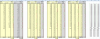
upload_2015-3-25_14-1-22.png

Extra score to who can populate the list into a comment,
So H3 would get a comment with the list of store1,2,3 who has a zero in their column on row 3.

Br
Magnus
 

Attachments

Hi Magnus ,

I think your problem specification is not clear.

I can understand that you wish to put in values from row 1 into the cells H37 , I37 and J37 ; these values can be Store 1 , Store 2 and Store 3.

Given that you have put all data in the form of RANDBETWEEN , there is no way anyone can ask you anything specific , since each time the worksheet is refreshed , the data changes ; it would have been much better if you had converted all the random data to values so that it does not change ; the file that anyone downloaded and had doubts about would be the same one that you also had.

Narayan
 
Hi,

I have updated the file so it contains static values.
Allthough i left O25 and U25 with no formulas in original file.

But you are correct, do you have a solution for this?
 

Attachments

Hi Magnus ,

Thank you for uploading a new file ; with reference to that , I would like to know the following :

O25 and U25 have 0.

Rows 27 through 33 have zero in columns I , O and U.

What exactly is supposed to appear in H37 , I37 and J37 ?

Narayan
 
I have changed the file a bit, hopefully more clear now,
In the original file there is alot of more store's, like 100, but if i could solve it with 3 it's adoptable to everything.

Basically, i want column AA:A? populate with Stores that has a zero value in their column, so in this example it shows Store2 in row 25, but it should also show store3 cause it's zero as well.

upload_2015-3-25_16-56-30.png
 

Attachments

Back
Top