
You are using an out of date browser. It may not display this or other websites correctly.
You should upgrade or use an alternative browser.
You should upgrade or use an alternative browser.
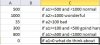
Pls help! is it possible use many if in a column ?
- Thread starter iRasim
- Start date


Abdul Matheen
Member
Hi,
write the below formula in column B1 and drag down till data ends.
=if(a1>1000,"Best",if(a1>500,"Normal",if(a1<100,"Bad","")))
Regards
Abdul Matheen
write the below formula in column B1 and drag down till data ends.
=if(a1>1000,"Best",if(a1>500,"Normal",if(a1<100,"Bad","")))
Regards
Abdul Matheen
Abdul Matheen
Member
Hi,
Below the multiple IF condition in Excel, drag the formula till end.
=If(and(a1>=500,a1<1000),"Normal",if(a1>1000,"Wonderful",if(and(a1>=100,a1<500),"Going Hard",if(a1<100,"Bad",""))))
Regards
Abdul Matheen
Below the multiple IF condition in Excel, drag the formula till end.
=If(and(a1>=500,a1<1000),"Normal",if(a1>1000,"Wonderful",if(and(a1>=100,a1<500),"Going Hard",if(a1<100,"Bad",""))))
Regards
Abdul Matheen

Abhijeet R. Joshi
Active Member
Hi,
One conflict in your image is that <100=BAD and =0 "What do you think about this?"
So if the value is 0 then the value is <100 as well, below is a bit altered formula:
=IF(AND($A1>=500,$A1<1000),"Normal",IF($A1>1000,"Wonderful",IF(AND($A1<>0,$A1<100),"BAD",IF(AND($A1>=100,$A1<500),"Going Hard",IF($A1=0,"What do you think about this?","")))))
One conflict in your image is that <100=BAD and =0 "What do you think about this?"
So if the value is 0 then the value is <100 as well, below is a bit altered formula:
=IF(AND($A1>=500,$A1<1000),"Normal",IF($A1>1000,"Wonderful",IF(AND($A1<>0,$A1<100),"BAD",IF(AND($A1>=100,$A1<500),"Going Hard",IF($A1=0,"What do you think about this?","")))))

Somendra Misra
Excel Ninja
Hi....Considering data in column A put this formula in column B and copy down
=LOOKUP(A1,{0,100,500,1000},{"Bad","OK","Good","Best"})
Regards!
=LOOKUP(A1,{0,100,500,1000},{"Bad","OK","Good","Best"})
Regards!

SirJB7
Excel Rōnin
Hi, iRasim!
Just as a tip, remember that if you enter in an empty cell "=XXX(" (unquoted) and press the "fx" button at the left of the edition bar text box, you'll be prompted with the function wizard which shows every argument, gives a brief description of the function and by the bottom left link lets you access the built-in or online help. It works for any function.
The same from the VBA editor, you can place the cursor (keyboard, so click, don't hover with mouse) on any VBA reserved word and press F1 to access the same type of help.
Regards!
Just as a tip, remember that if you enter in an empty cell "=XXX(" (unquoted) and press the "fx" button at the left of the edition bar text box, you'll be prompted with the function wizard which shows every argument, gives a brief description of the function and by the bottom left link lets you access the built-in or online help. It works for any function.
The same from the VBA editor, you can place the cursor (keyboard, so click, don't hover with mouse) on any VBA reserved word and press F1 to access the same type of help.
Regards!
Somendra Misra
Excel Ninja
@iRasim ...
Glad you slove it.
I had use Lookup formula. Syntax is LOOKUP(lookup_value, lookup_vector, [result_vector]). So it will look a value (A1) in LookUp vector ({0,100,500,1000}). If the value if found it will return the corresponding value from result vactor ({"Bad","OK","Good","Best"}). If the LOOKUP function can not find an exact match, it chooses the largest value in the lookup_range that is less than or equal to the value.
Say A1 is 100 than it is the second item in lookup_vector so that value that it will return from result_vector is OK.
Say A1 is 750 than it is not in lookup_vector so that value lower than it is 500, so it will return from result_vector is Good corresponding to it.
You do have to name the colunms.
Hope this had given you some insight. For a detail help on the function visit Excel Help.
Regards!
Glad you slove it.
I had use Lookup formula. Syntax is LOOKUP(lookup_value, lookup_vector, [result_vector]). So it will look a value (A1) in LookUp vector ({0,100,500,1000}). If the value if found it will return the corresponding value from result vactor ({"Bad","OK","Good","Best"}). If the LOOKUP function can not find an exact match, it chooses the largest value in the lookup_range that is less than or equal to the value.
Say A1 is 100 than it is the second item in lookup_vector so that value that it will return from result_vector is OK.
Say A1 is 750 than it is not in lookup_vector so that value lower than it is 500, so it will return from result_vector is Good corresponding to it.
You do have to name the colunms.
Hope this had given you some insight. For a detail help on the function visit Excel Help.
Regards!