• Hi All

    Please note that at the Chandoo.org Forums there is Zero Tolerance to Spam

    Post Spam and you Will Be Deleted as a User

    Hui...

  • When starting a new post, to receive a quicker and more targeted answer, Please include a sample file in the initial post.

Pivot Chalenge

dgk

Member
Hi
I need help with my pivot table
Have info on a bunch of months and have a pivot table field that calculates the difference from previous month on all fields.
But
On the last month
I only have info on 2 fields (which I want to be calculated) and the rest of the fields (there is zeros on the original data) please don’t do any calculations leave it blank

Please see sample file
 
But you do have data for November; zeroes.
I'd suggest filtering out Nov in the months field in the Pivot.
 
Last edited:
Hi
yes there is info for november in the first 2 fields (and i need those)
Look again Please
Thanks
 
So how do you decide there are no data?
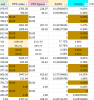
Zeroes don't cut it. For example, in at least 2 of the source data fields (PPC sales and TACOS) you have zeroes which you seem to want to take into account (brown cells highlighted in the screenshot below). How can I tell the difference between a zero meaning zero and a zero meaning 'no data'?
77016
 
Last edited:
Hi
Thanks for responding
I made all the zeros as blanks in the original data , sheet "data1".

And i want that it shouldn't show anything in the diff from previous from Field if there is no info on these fields (don’t show the difference)

I attached the new file
Thanks
 

Attachments

Back
Top