gossip_boi
New Member
Dear All,
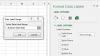
I have a question. Being inspired by this article http://chandoo.org/wp/2015/09/22/how-countries-spend-their-money/ I created smth similar to the original chart. Please, find the file attached. So, you can see that I can't change numeric names into non-numeric values. How can I do it? Here https://sites.google.com/site/e90e50fx/home/matrix-bubble-chart-with-excel the solution was made with class modules but I would like to avoid it.
Thanks a lot for trying to help =)
I have a question. Being inspired by this article http://chandoo.org/wp/2015/09/22/how-countries-spend-their-money/ I created smth similar to the original chart. Please, find the file attached. So, you can see that I can't change numeric names into non-numeric values. How can I do it? Here https://sites.google.com/site/e90e50fx/home/matrix-bubble-chart-with-excel the solution was made with class modules but I would like to avoid it.
Thanks a lot for trying to help =)