For a seasoned Excel user this maybe a stupid question, however I am having a really hard time trying to figure out this formula...
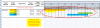
I have built a spreadsheet for resource allocation. I have a list of start dates, and end dates of projects, then a list of two years worth of days along the top. What I need to know is how I can have the cells automatically become colored for the specific dates, just as you would see in the tasks of a gantt chart.
I have attached an example of what I'm trying to achieve.
Any help would be greatly appreciated!
Thank you!
I have built a spreadsheet for resource allocation. I have a list of start dates, and end dates of projects, then a list of two years worth of days along the top. What I need to know is how I can have the cells automatically become colored for the specific dates, just as you would see in the tasks of a gantt chart.
I have attached an example of what I'm trying to achieve.
Any help would be greatly appreciated!
Thank you!