• Hi All

    Please note that at the Chandoo.org Forums there is Zero Tolerance to Spam

    Post Spam and you Will Be Deleted as a User

    Hui...

  • When starting a new post, to receive a quicker and more targeted answer, Please include a sample file in the initial post.

Making a bar graph with dummy column in Excel

OSK

New Member
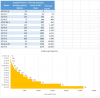
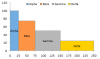
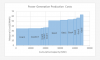
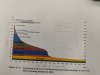
I need to create a graph just like the one shown in the picture i attached. it does not need to have the curve, rectangular bars would be fine. but the axis should be the same. from what i searched, i found out i have to make dummy columns but I cant figure out how to make it in excel. If someone can explain, it will be helpful. Thanks (link to sample data in excel file is attached).
IMG_20180803_125729.jpg
 

Attachments

Hello Hui
Thanks for the answer, but i need to y axis as MW and the height of each bar should show MW. E.g if the MW of 1 turbine is more the height would be more if MW is low the height would be low. And on x axis it should show the exact operating hours. Like for the most operating turbine its 8170 but in graph it shows 26000. Have a look at the pic i attached. The y axis in it and how the heights of bars are changing with the value.

Best
 
OSK
Your data has 'more rows'.
If You would like to see both x & y-axis widths&heights as in Your sample.
So far, challenge with bar-graph (for me) ...
but if could use other way then something like in this file.
If really with bars, then it's also would be possible ...
but then I need to know exact what would be fixed per every 'year'.
(= datas layout have to be same, as well as 'graph's position on sheet ).
 

Attachments

OSK
Did You mean this?
Screen Shot 2018-08-05 at 14.35.30.png
but in Your case
Alpha should be show only above ~75
Beta x0 & y>~50
Gamma x0 & y> ~25
Delta x0 & y ~25
If compare this to You sample graph or how?
 
no i meant this graph. someone asked a question in comments and asked how to make it. find it in comments. one person explained how to make it. but i cant make it work.


upload_2018-8-5_13-45-4.png
 
OSK
If You 'like to get' as in my #11 then there are few challenges
which You could see in my #7 sample.
There would need 'a lot of dummy columns' ... or
do it other way!
 
yes great, we can put it as legend and show which color represents what. can you explain a little bit how you made this. Thanks
 
OSK ... oops! ... this reply was still here :(
I moved that 'box' ... better place.
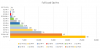
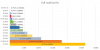
Now, there are colors, texts, values 'like legend'.
It is made 'box-by-box' ;)
... add some 'features'
 

Attachments

OSK ... oops! ... this reply was still here :(
I moved that 'box' ... better place.
Now, there are colors, texts, values 'like legend'.
It is made 'box-by-box' ;)
... add some 'features'

Vletm
Thank you very much for your help. i really appreciate it
 
The more I look the more I think it's meant to be there; it even has its own label.
This suggests to me a stacked bar chart with very thin bars.
 
Back
Top