• Hi All

    Please note that at the Chandoo.org Forums there is Zero Tolerance to Spam

    Post Spam and you Will Be Deleted as a User

    Hui...

  • When starting a new post, to receive a quicker and more targeted answer, Please include a sample file in the initial post.

INDEX with a horizontal array

Naceur

New Member
I have used INDEX function with a horizontal array but I have made an error. The problem is that INDEX always returns the correct answer. Here is the case:
Let's say you have the values "A", "B" and "C" in cells C3, D3 and E3.
In a blank cell, type the formula =INDEX(C3:E3,2) (this formula retrieves the value in the 2nd row in a horizontal array with ONE row.
The problem is that this formula will return the right result, i.e. the second value "B".
Now try the formula =INDEX(C3:E3,,2). It will return the same result.

Does anyone have an explanation?

NB: it doesn't work with a vertical array
 
Naceur
Have You check index's syntax ... ?
Syntax
INDEX(array, row_num, [column_num])
The array form of the INDEX function has the following arguments:

  • array Required. A range of cells or an array constant.
    • If array contains only one row or column, the corresponding row_num or column_num argument is optional.
    • If array has more than one row and more than one column, and only row_num or column_num is used, INDEX returns an array of the entire row or column in array.
  • row_num Required, unless column_num is present. Selects the row in array from which to return a value. If row_num is omitted, column_num is required.
  • column_num Optional. Selects the column in array from which to return a value. If column_num is omitted, row_num is required.
Remarks
  • If both the row_num and column_num arguments are used, INDEX returns the value in the cell at the intersection of row_num and column_num.
  • row_num and column_num must point to a cell within array; otherwise, INDEX returns a #REF! error.
  • If you set row_num or column_num to 0 (zero), INDEX returns the array of values for the entire column or row, respectively. To use values returned as an array, enter the INDEX function as an array formula.
 
Yes, I did check thr syntax.
Just try the example I gave in a blank worksheet and you'll see exactly what I mean.
 
Naceur
... yes You checked

Your The problem is that INDEX always returns the correct answer.
Most of time ... the p... is something else.
With a blank worksheet ... blank.

What else would Your second formula give?
... some wrong value?
Why won't use use row_num as it's required?
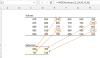
Screenshot 2021-12-22 at 10.23.46.png
 
The same considerations apply to a column array as for a row.
You can address it using one index or two. If used, the second index may not be greater than 1. Zero and blank may also be used and these refer to the entire row (a single value for a list).
Internally, Excel treats all ranges as 2D as illustrated by the table. If the table contains more than one row, the second index must be provided. Again zero and blank are valid and have special meaning.

77346

The only oddity, is that for your row array, the column index appears by itself and it is not necessary to leave a blank field for the unused row index.
 
The same considerations apply to a column array as for a row.
You can address it using one index or two. If used, the second index may not be greater than 1. Zero and blank may also be used and these refer to the entire row (a single value for a list).
Internally, Excel treats all ranges as 2D as illustrated by the table. If the table contains more than one row, the second index must be provided. Again zero and blank are valid and have special meaning.

View attachment 77346

The only oddity, is that for your row array, the column index appears by itself and it is not necessary to leave a blank field for the unused row index.
Yes, that's the oddity I'm talking about.
 
@ Vletm: I'm talking about this form [=INDEX(C3:E3,2)]. It refers to the second row of range C3:E3 (which does not exist)
 
Back
Top