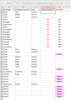
K Kelli Webb Member Apr 13, 2021 #1 Hello, This is probably the easiest to resolve, but I'm struggling... If column C is blank, then apply the formula in column D e.g. Yes or Blank What the result should be is in column E take care & thanks people, Kelli Attachments Chandoo IF cell is blank then formula.xlsx Chandoo IF cell is blank then formula.xlsx 30.2 KB · Views: 13
Hello, This is probably the easiest to resolve, but I'm struggling... If column C is blank, then apply the formula in column D e.g. Yes or Blank What the result should be is in column E take care & thanks people, Kelli
A abhi0300 New Member Apr 13, 2021 #2 I am afraid I didn't understand your requirement fully. Wherever there is a blank in Col C, your formula is returning Yes in Col D (as also it should, per Col E). What is the change in Row 19 so you want it to return blank?
I am afraid I didn't understand your requirement fully. Wherever there is a blank in Col C, your formula is returning Yes in Col D (as also it should, per Col E). What is the change in Row 19 so you want it to return blank?
B bosco_yip Excel Ninja Apr 13, 2021 #3 Maybe, In D2, formula copied down : =IF((B2<>"")*(C2<>"")+SUMPRODUCT(1-ISERR(SEARCH("Support",C$1:C1))),"","Yes")
Maybe, In D2, formula copied down : =IF((B2<>"")*(C2<>"")+SUMPRODUCT(1-ISERR(SEARCH("Support",C$1:C1))),"","Yes")
K Kelli Webb Member Apr 21, 2021 #4 bosco_yip said: Maybe, In D2, formula copied down : =IF((B2<>"")*(C2<>"")+SUMPRODUCT(1-ISERR(SEARCH("Support",C$1:C1))),"","Yes") View attachment 74074 Click to expand... Perfect as always. thanks Bosco!
bosco_yip said: Maybe, In D2, formula copied down : =IF((B2<>"")*(C2<>"")+SUMPRODUCT(1-ISERR(SEARCH("Support",C$1:C1))),"","Yes") View attachment 74074 Click to expand... Perfect as always. thanks Bosco!