Hello,
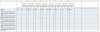
When i create my pivottable it looks like figure 1 below. But i want to know how to sort the pivottable so that it looks like figure 2? ex. jan jan, feb feb, mar, mar, apr, apr etc. and the total are ok at the end like they are.
thanks for your help,
Zohaib
figure 1
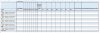
figure 2
When i create my pivottable it looks like figure 1 below. But i want to know how to sort the pivottable so that it looks like figure 2? ex. jan jan, feb feb, mar, mar, apr, apr etc. and the total are ok at the end like they are.
thanks for your help,
Zohaib
figure 1
figure 2