

ThrottleWorks
Excel Ninja
How to populate email body in next line.
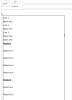
For example if I want to populate mail as below
Text line 1
Blank line
Text line 2
Blank line
Text line3
Blank line
Text line 4
Blank line 4
I tried below mentioned code but it is not working.
I pass blank cells to create blank line even that is not working.
For example, E1 E2 and E5 are blank cells.
How can we do it. Can anyone please help me in this.
For example if I want to populate mail as below
Text line 1
Blank line
Text line 2
Blank line
Text line3
Blank line
Text line 4
Blank line 4
I tried below mentioned code but it is not working.
I pass blank cells to create blank line even that is not working.
For example, E1 E2 and E5 are blank cells.
How can we do it. Can anyone please help me in this.
Code:
Sub Email_Body_02()

    Dim strBody1 As String
    Dim strBody2 As String
    Dim strBody3 As String
    Dim strBody4 As String

    strBody1 = "<font size=""2"" face=""Calibri"" color=""Black"">" & EmailSht.Range("D1").Value & EmailSht.Range("E1").Value

    strBody2 = "<font size=""2"" face=""Calibri"" color=""Black"">" & EmailSht.Range("D2").Value & EmailSht.Range("E2").Value

    strBody3 = "<font size=""2"" face=""Calibri"" color=""Black"">" & EmailSht.Range("D5").Value & EmailSht.Range("E5").Value


    Set OutApp = CreateObject("Outlook.Application")
    Set OutMail = OutApp.CreateItem(0)

    On Error Resume Next
        With OutMail
            .SentOnBehalfOfName = EmailSht.Range("b1")
            .To = EmailSht.Range("b2")
            .CC = EmailSht.Range("b3")
            .Subject = MacroSht.Range("z4")
            .HTMLBody = Msg & strBody1 & Chr(13) & vbNewLine & strBody2 & Chr(13) & vbNewLine & strBody3 & Chr(13)
            .Save
        End With
    On Error GoTo 0

    Set OutMail = Nothing
    Set OutApp = Nothing
End Sub
Last edited:


 . Do not know what I was trying.


