
You are using an out of date browser. It may not display this or other websites correctly.
You should upgrade or use an alternative browser.
You should upgrade or use an alternative browser.
How to count the color cell in conditional formatting?
- Thread starter Falinaicare
- Start date
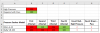
Since you have value In B2 and B3, you could use it as criteria for the COUNTIF function and instead of count color cells.
1] In F7, copied down :
=COUNTIF($B7:$E7,">=200")
or, =COUNTIF($B7:$E7,">="&B$2)
2] In G7, copied down :
=COUNTIF($B7:$E7,"<=199")
or, =COUNTIF($B7:$E7,"<="&B$3)
1] In F7, copied down :
=COUNTIF($B7:$E7,">=200")
or, =COUNTIF($B7:$E7,">="&B$2)
2] In G7, copied down :
=COUNTIF($B7:$E7,"<=199")
or, =COUNTIF($B7:$E7,"<="&B$3)
Last edited:
Falinaicare
Member
Dear Bosco,
Thank you for your excel function.
What if there is no value in B2 and B3, could I just count only for cell color, such as how many red colors and how many green colors?
Reason: the value might change based on their(boss) requirement.
Kindly advise with thanks.
Thank you for your excel function.
What if there is no value in B2 and B3, could I just count only for cell color, such as how many red colors and how many green colors?
Reason: the value might change based on their(boss) requirement.
Kindly advise with thanks.
rahulshewale1
Active Member
Hi @Falinaicare ,
https://trumpexcel.com/count-colored-cells-in-excel/
See if is it okey VBA Solution.
https://trumpexcel.com/count-colored-cells-in-excel/
See if is it okey VBA Solution.
Code:
Option Explicit
'Code created by Sumit Bansal from https://trumpexcel.com
Function GetColorCount(CountRange As Range, CountColor As Range)
Dim CountColorValue As Integer
Dim TotalCount As Integer
CountColorValue = CountColor.Interior.ColorIndex
Set rCell = CountRange
For Each rCell In CountRange
  If rCell.Interior.ColorIndex = CountColorValue Then
    TotalCount = TotalCount + 1
  End If
Next rCell
GetColorCount = TotalCount
End Function
Attachments
Last edited:
Falinaicare
Member
rahulshewale1
Active Member
Falinaicare
Member
Peter Bartholomew
Well-Known Member
It is just about possible to make Excel respond to manual changes of colour. I would not recommend it and prefer @bosco_yip's solution which uses the criterion that also controls the conditional format.
I defined a named function 'GET.COLOR' to be
=CEILING.MATH(RAND(),1)*GET.CELL(63,testResult)
which was invoked by the formula
=LOOKUP(GET.COLOR,{0,3,43},{"","Red","Green"})
in helper cells 'resultRange', leading to the formulae
= COUNTIFS(resultRange,"Red")
= COUNTIFS(resultRange,"Green")
I defined a named function 'GET.COLOR' to be
=CEILING.MATH(RAND(),1)*GET.CELL(63,testResult)
which was invoked by the formula
=LOOKUP(GET.COLOR,{0,3,43},{"","Red","Green"})
in helper cells 'resultRange', leading to the formulae
= COUNTIFS(resultRange,"Red")
= COUNTIFS(resultRange,"Green")
Attachments
Falinaicare
Member
Hi Peter Bartholomew,
I like your idea that combined with @bosco_yip excel code. Simple but only 1 question.
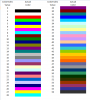
Where can I get the color code? {0,3,43}
Many Thanks
I like your idea that combined with @bosco_yip excel code. Simple but only 1 question.
Where can I get the color code? {0,3,43}
=LOOKUP(GET.COLOR,{0,3,43},{"","Red","Green"})
Many Thanks
Another Count Cell Color formula option using GetCell function but without helper cells.
1] Copy background color from data to criteria header : F6 with Red, G6 with Green
2] Create a range name by :
3] In F7, formula copied right to G7 and all copied down :
=CountColor
Remark : Since GetCell is a Macro 4 function, the file need to be saved in "xlsm" type "Excel Macro-Enabled Worksheet"

1] Copy background color from data to criteria header : F6 with Red, G6 with Green
2] Create a range name by :
- Select F7 >> Formulas >> Define Name >>
- Name : Countcolor
- Refers to : =SUMPRODUCT(0+(GET.CELL(63,IF(1,+OFFSET($B7:$E7,,COLUMN($B7:$E7)-MIN(COLUMN($B7:$E7)))))=GET.CELL(63,F$6)))
- OK >> Finish
3] In F7, formula copied right to G7 and all copied down :
=CountColor
Remark : Since GetCell is a Macro 4 function, the file need to be saved in "xlsm" type "Excel Macro-Enabled Worksheet"
Attachments
Last edited:
Peter Bartholomew
Well-Known Member
The colour indices are from the original colour system offered in Excel; a pretty unpleasant set of colours they are too, with little apparent logic.
https://access-excel.tips/excel-vba-color-code-list/
BTW
CEILING.MATH(RAND(),1)
is intended to do nothing except force a re-evaluation whenever a change is made to the workbook.
https://access-excel.tips/excel-vba-color-code-list/
BTW
CEILING.MATH(RAND(),1)
is intended to do nothing except force a re-evaluation whenever a change is made to the workbook.