• Hi All

    Please note that at the Chandoo.org Forums there is Zero Tolerance to Spam

    Post Spam and you Will Be Deleted as a User

    Hui...

  • When starting a new post, to receive a quicker and more targeted answer, Please include a sample file in the initial post.

Help with Search and Identify Query

snellij

New Member
Hello

I need to identify every cell in a spreadsheet that has an ordinary range (NOT a NAME RANGE) included somewhere in it. e.g. sum(A1:B22), counta(z435:aa543), vlookup(b4, g65:h75, 3) etc...

Currently, I am searching for the colon symbol : but this is taking forever, one cell at a time.

Is there a method, or is there a VBA solution, that can find each cell that contains a range like this and summarises the results in a list that show the actual formula in one column and the cell that the range is located in in another column?

Many thanks in Anticipation.

John
 
Snellij

Firstly, Welcome to the Chandoo.org Forums

Just one question what about cells which have a formula like =B2
and people do things like =Sum(B2)
Those both have a range and doesn't contain a :

Can you perhaps explain what you are trying to achieve?
 
Hello Hui

Many thanks for your welcome.

I am trying to change all the cell ranges within a number of spreadsheets from ordinary cell ranges to named cell ranges. This is to comply with SOX, or the Sarbanes Oxley Act. I had assumed, possibly incorrectly, that this only applied to multi-reference ranges (e.g. A12:A75) rather than single cell range, such as you referred to.

I've found a nice piece of code here - https://www.mrexcel.com/forum/excel-questions/33170-code-extract-formula-cell-2.html - that returns a list of all the formulas in a specific worksheet, and then I simply apply a filter & filter on formulae that contain a colon. However, it seems to group similar formulae together and increment a counter in Column A whereas I would ideally like every formula in the worksheet to be displayed.

Any help, you or anyone else, could provide would be greatly appreciated.

Kind Regards

John
 
Snellij

Firstly, Welcome to the Chandoo.org Forums

Just one question what about cells which have a formula like =B2
and people do things like =Sum(B2)
Those both have a range and doesn't contain a :

Can you perhaps explain what you are trying to achieve?


Hi Hui

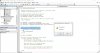
I'd already found the link https://www.thespreadsheetguru.com/the-code-vault/2014/4/21/find-all-instances-with-vba but each time I tried to run the code I got a Syntax Error Compile error message as per the attached screenshotCapture.JPG
 
I'd recommend first pasting code into Text editor and checking that it is clean and does not contain any non-printing character etc in there.

I tested the code from your link and had no issue running it on my end.
 
Back
Top