• Hi All

    Please note that at the Chandoo.org Forums there is Zero Tolerance to Spam

    Post Spam and you Will Be Deleted as a User

    Hui...

  • When starting a new post, to receive a quicker and more targeted answer, Please include a sample file in the initial post.

Help to copy data from one sheet to another according to date

Fred Wayne

Member
Hello,
I have an excel file called "Data", it has 2 sheets named "Data" and "Daily". Data several values, and Daily has nothing, "At the moment". I have created a simple userform with a ComboBox that displays the some dates to choose from. I need to find out a code to filter data from Data sheet and copy the data in Daily sheet according to the date chosen from the ComboBox. Is this posible?

Here you have the file I am using now. Thank you again.
 

Attachments

But I am trying to set this coding to my file and for some reason I can´t make it run. Can you help me please? Here I am sending the orignal file, I need that all data stored in Sheet called "Data Base" to be transfered by date selection to Sheet called "Daily". I don't know what I doing wrong! Thannk you sooooooooooooo much for the help in advance.
 

Attachments

It works amazing! But for some reason, when I empty the Sheet "Data Base", I got an error that says "Run-Time error '13': Type mismatch, and when I manually enter the data, the main userform works. Another situation that happens is on the "Printing Data" userform, I don't know why it displays "22/03/2030" as the date when it should display "30-03-2022 06:39 PM". Once again, thank you for the extraordinary help!
 

Attachments

It would be better to Printing Data form to show the following format "30-03-22" I have tried to modify the date format and I could have not gotten it so far.
 
I have managed the Printing Data form to display the dates as 01/04/2022, but what I can not understand is why the format of the dates in the sheet called "Daily" does not display the dates of the months in consecutive day order, for example, from 1-4-22, follows 2-4-22, then 3-4-22, then 4-4-22 and so on forth. But it does not make consecutive day order, what it does is consecutive month order. What can I do to fix it?, The same happens when I open the Printing Data ComboBox, it displays the dates in consecutive month order instead of consecutive day order. So it means that I cannot filter because the dates from the ComboBox don't match with the dates displayed on LB_00 ListBox. I am becoming crazy about finding a solution to this! Help, please. I am sending the original file plus some pictures of the errors on the dates! Thank you in advance.
 

Attachments

Fred Wayne
Have You tested Your dates with YY-MM-DD? (( or DD-MM-YY ))
... then those dates would work as text or real dates
As You're using UserForm - I won't test Your file.
 
Nope. It didn't work. I will see what can I do. But I have tried doing it in so many times, however, I don't give up.
 
Hello. I was working on this file for a project. The Project was a success. How now I have some issues. The issue is displayed on the userform called "Print_DATA". For some reason, I can´t fathom, the userform displays the information already entered in a date format which is not correct. So it means that instead of displaying 5/15/2022, it displays 5/22/2015. I just don´t know what to do? I have tried different coding combinations and it has become a hard-no-win for me. Is there a way to fix this? I am using windows 10 and Microsoft Office Professional 2013. Please help! I would really appreciate it. Thank you in advance.
 

Attachments

Fred Wayne
Few comments - questions ...
Date ... formats ... Is there any reason that You're using many kind of ... formats with dates?
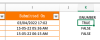
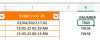
One sheet - below - 03/04/2022 17:02 is real date but other two are not ... looks act like texts.
Screenshot 2022-05-15 at 16.13.38.png

My Excel-version ... didn't open Your PRINT_DATA -form ... that's normal.
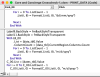
But I found from its code two kind of date formats.
Screenshot 2022-05-15 at 16.14.44.png

Your 5/15/2022, it displays 5/22/2015
Looks like year and day has swapped.
Do You save forms-dates as text or as date to Your sheets?
... if You're saving as text then, there will be some challenges.
 
There is a sheet called "Dates" and another called "DataBase". Both sheets are VeryHidden and have dates formats information.
 
Fred Wayne
I found those sheets.
One sheet - below - 03/04/2022 17:02 is real date but other two are not ... looks act like texts.
Have You tried to fix manually those two 15-05-22 ... -texts to real dates?
Screenshot 2022-05-15 at 16.13.38.png
Isn't Your challenge 5/15/2022, it displays 5/22/2015 somewhere?
It matters, what is in those cells - with format - You could apply wanted look.
 
Fred Wayne
No matter of format!
Please,
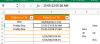
write to cell J3 values as below written in cell C6 and
write to cell J4 value as below written in cell C7.
Screenshot 2022-05-15 at 17.25.05.png
Cell's value matters.
 
Back
Top