• Hi All

    Please note that at the Chandoo.org Forums there is Zero Tolerance to Spam

    Post Spam and you Will Be Deleted as a User

    Hui...

  • When starting a new post, to receive a quicker and more targeted answer, Please include a sample file in the initial post.

Help on understanding Multiple Linear Regression in Excel

Belle23p

New Member
Hello Chandoo friends :)

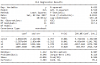
I would like to seek your assistance in understanding and interpreting (hopefully) my data in Multiple linear regression.

I have attached the file for your reference.

My questions/queries are the following:

1. I have computed the MEAN, MEDIAN, MAXIMUM and MINIMUM. Kindly confirm if I got the formulas right?

2. Looking at the data and the Significance F (0.011) and at the 95% confidence level, I can reject or accept that my x variables are significant? (Sorry I am confused with this part)

3. I was hoping to get the correlation coefficient, is it a different formula?

4. The values of the coefficient estimate are the one under the column coefficient? Yes?

Thank you.
 

Attachments

Hi,

This seems to be that you are trying to perform multiple linear regression on your data ...

Here are the answers:


1. I have computed the MEAN, MEDIAN, MAXIMUM and MINIMUM. Kindly confirm if I got the formulas right?

Ans: Yes. These are calculated correctly. I have cross checked the same with Python and the output is matching

2. Looking at the data and the Significance F (0.011) and at the 95% confidence level, I can reject or accept that my x variables are significant? (Sorry I am confused with this part)

Ans: Significance F = FDIST(Regression F, Regression df, Residual df) = Probability that equation does NOT explain the variation in y, i.e. that any fit is purely by chance. This is based on the F probability distribution. If the Significance F is not less than 0.1 (10%) you do not have a meaningful correlation.

In your case Significance of F = 0.011, there is only a 1% chance that the Regression output was merely a chance occurrence.

3. I was hoping to get the correlation coefficient, is it a different formula?

Ans: In your analysis output, you can refer to the column P-value to determine the significance of each factor in the regression analysis

4. The values of the coefficient estimate are the one under the column coefficient? Yes?

Ans: Yes. This value can be substituted in your linear equation y=mx+c along with Intercept value to predict your Y

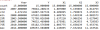
I also have performed this Multi linear regression test in Python and here is the output:

upload_2017-12-2_10-31-37.png

I have continued performing the backward elimination analysis and I could notice that the independant variable X1 and X2 is having the impact on the dependant variable Y. When I further analysed based on the P value i see the column X1 is having the impact..

I hope that provides some inputs..

Thanks,
Ramesh
 
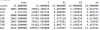
Here is the numerical summary of your data:

upload_2017-12-2_13-15-58.png
 

Attachments

  • upload_2017-12-2_13-15-56.png
    upload_2017-12-2_13-15-56.png
    12.8 KB · Views: 3
Hello Ramesh,

Thank you for answering my questions. I actually have a follow up question regarding the:

1. You confirm that Correlation Coefficient is the P-value column. I am trying to interpret the result and I found out on the internet that This values can validate the hypothesis made. And that a:

A small p-value (typically ≤ 0.05) indicates strong evidence against the null hypothesis, so you reject the null hypothesis.

A large p-value (> 0.05) indicates weak evidence against the null hypothesis, so you fail to reject the null hypothesis.

p-values very close to the cutoff (0.05) are considered to be marginal (could go either way). Always report the p-value so your readers can draw their own conclusions.

So based on my result, X1 and X3 are less than 0.05 and that I can confirm that both variables have a significant relationship with Y? and X2 is considered as large P value and this makes a weak relationship to Y?

Thank you so much for your assistance!

Belle
 
Back
Top