Hello,
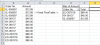
I have a worksheet with thousands of order and its corresponding dollar amount. Each order may show multiple times with the same dollar amount. I need to show only one amount per order; I do not want to sum the Order amount.Can anybody please help with a formula to accomplish this task?
Example:
Order No. Amount
XL-056697 $12.89
XL-056697 $12.89
XL-056697 $12.89
NY-09137 $46.00
NY-09137 $46.00
NY-09137 $46.00
NY-09137 $46.00
NY-09137 $46.00
ED-267619 $88.45
ED-267619 $88.45
ED-267619 $88.45
Thanks in advance for your help,
Manny
I have a worksheet with thousands of order and its corresponding dollar amount. Each order may show multiple times with the same dollar amount. I need to show only one amount per order; I do not want to sum the Order amount.Can anybody please help with a formula to accomplish this task?
Example:
Order No. Amount
XL-056697 $12.89
XL-056697 $12.89
XL-056697 $12.89
NY-09137 $46.00
NY-09137 $46.00
NY-09137 $46.00
NY-09137 $46.00
NY-09137 $46.00
ED-267619 $88.45
ED-267619 $88.45
ED-267619 $88.45
Thanks in advance for your help,
Manny