• Hi All

    Please note that at the Chandoo.org Forums there is Zero Tolerance to Spam

    Post Spam and you Will Be Deleted as a User

    Hui...

  • When starting a new post, to receive a quicker and more targeted answer, Please include a sample file in the initial post.

Excel 2013 giving wrong answer to formula

Hi,
I am using Excel 2013 and when I put in a formula I get the wrong answer, the information for the formula is : 0.53-0.30*4400 The answer should be 1012 but Excel give the answer 9944
Any help greatly appreciated.
Noel
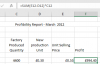
 
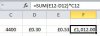
Thank you for your reply, I am sorry I wasn't really clear in my original email. I am using Parentheses, please see snip below
Thanks again,
Noel
upload_2016-5-4_19-47-5.png
 
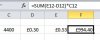
…or are you doing something like this (not seeing part of the multi-line formula)?:
It looks like:
Capture.JPG
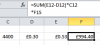
but is actually:
upload_2016-5-4_20-11-21.png
 
Last edited:
Either D12 or E12 or both is actually 3 decimal places, but the cell is formatted to only show 2 decimal places.
Place your cursor right on each of those 2 cells and see what the actual number is in those cells.

I was able to come up with a result of 994.40 when I changed D12 to .304
 
Hi,

Wrapping with SUM is not necessary here, result can be achieved with just:
=(E12-D12)*C12

As @candybg pointed out either D12 = 0.304 or E12 = 0.526 and formatted to show only 2 decimals.

Regards,
 
Hi All,
first of all thank you for all of your replies and apologies for the delay in replying, I was expecting the forum to alert me when someone replied to my question but I did'nt receive any alerts.
I did a re-install of Excel and all is working fine now.
Thanks again for all your great suggestions.
Best Regards,
Noel
 
Hi Noel,

Glad you've solved.
Thanks for the feedback.

I was expecting the forum to alert me when someone replied to my question but I did'nt receive any alerts.

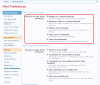
Click on your profile name, go to Alert Preference, and make sure you have enabled these:

Alert Preferences.PNG

Regards,
 
Back
Top