• Hi All

    Please note that at the Chandoo.org Forums there is Zero Tolerance to Spam

    Post Spam and you Will Be Deleted as a User

    Hui...

  • When starting a new post, to receive a quicker and more targeted answer, Please include a sample file in the initial post.

Enable CommandButton after data selected in comboBox

CR Anandan

New Member
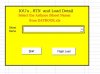
In Excel VBA , Pls help me code , on Open Workbook() disable CommandButton and when data selected in comboBox Enable command Button.
 

Attachments

  • Capture.JPG
    Capture.JPG
    30.2 KB · Views: 5
to Workbook1 - ThisWorkbook (Code)
Code:
Private Sub Workbook_Open()
    With UserForm1
        .CommandButton1.Visible = False
        .CommandButton2.Visible = False
'  next three lines for testing
        .ComboBox1.Clear
        .ComboBox1.AddItem "A"
        .Show
    End With
End Sub

to Workbook - UserForm1 (Code)
Code:
Private Sub ComboBox1_Change()
    With UserForm1
        .CommandButton1.Visible = True
        .CommandButton2.Visible = True
    End With
End Sub

Change Visible to Enabled, if You want to see buttons all the time.

 
Back
Top