
You are using an out of date browser. It may not display this or other websites correctly.
You should upgrade or use an alternative browser.
You should upgrade or use an alternative browser.
Custom Ribbon/Toolbar
- Thread starter SVN
- Start date

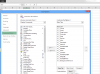
For the QAT there is an option on the top left to define the scope of the QAT
But I did not find something similar for the toolbar...
Maybe the following will give you some ideas...
http://social.msdn.microsoft.com/Fo...s-only-not-available-in-all-others?forum=vsto
http://excel.bigresource.com/Add-Custom-Menus-To-Single-Workbook-Only-m0XSfjq8.html
But I did not find something similar for the toolbar...
Maybe the following will give you some ideas...
http://social.msdn.microsoft.com/Fo...s-only-not-available-in-all-others?forum=vsto
http://excel.bigresource.com/Add-Custom-Menus-To-Single-Workbook-Only-m0XSfjq8.html
It seems possible according to
http://stackoverflow.com/questions/5724923/excel-2010-storing-ribbon-customization-in-workbook
http://stackoverflow.com/questions/5724923/excel-2010-storing-ribbon-customization-in-workbook
You may also want to read:
http://colinlegg.wordpress.com/
http://colinlegg.wordpress.com/