• Hi All

    Please note that at the Chandoo.org Forums there is Zero Tolerance to Spam

    Post Spam and you Will Be Deleted as a User

    Hui...

  • When starting a new post, to receive a quicker and more targeted answer, Please include a sample file in the initial post.

Countif a cell with values with text

Creative carla

New Member
Outocome: =countif the value of cell os equal or above 4...
Problem: it only counts the number without text
Question: how can i make the outcome?

5-
6+
4
8
6-
 
Maybe,

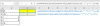
You need Sumproduct+Substitute instead of Countif, something like this:

In B1, formula:

=SUMPRODUCT(0+(0+(SUBSTITUTE(SUBSTITUTE(A1:A5,"-",""),"+",""))>=4))

or,

In B2, formula:

=SUMPRODUCT(0+(SUBSTITUTE(SUBSTITUTE(A1:A5,"-",""),"+","")>="4"))

82240
 
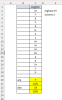
Just for the sake of something different using complex numbers and Excel 365!
Code:
= LET(
    complex,    marks & "j",
    real,       IMREAL(complex),
    imaginary,  IMAGINARY(complex),
    level,      IF(real, real, imaginary),
    adjusted,   IF(real, imaginary / 10, 0),
    pass,       (level + adjusted) > {4, 2},
    entrants,   COUNTA(marks),
    passes,     BYCOL(pass, LAMBDA(p, SUM(SIGN(p)))),
    percentage, passes / entrants,
    result,     VSTACK(passes, percentage),
    TOCOL(result, , TRUE)
 )
The complex numbers are simply a device to record the ± as an adjustment ±0.1.
The two thresholds of 2 and 4 are tested simultaneously.
Having two columns complicates the summation of passes so BYCOL is used.
The percentages are evaluated and placed under the pass counts.
TOCOL aligns the 4 values as a single column.
82252
 

Attachments

Just for the sake of something different using complex numbers and Excel 365!
Code:
= LET(
    complex,    marks & "j",
    real,       IMREAL(complex),
    imaginary,  IMAGINARY(complex),
    level,      IF(real, real, imaginary),
    adjusted,   IF(real, imaginary / 10, 0),
    pass,       (level + adjusted) > {4, 2},
    entrants,   COUNTA(marks),
    passes,     BYCOL(pass, LAMBDA(p, SUM(SIGN(p)))),
    percentage, passes / entrants,
    result,     VSTACK(passes, percentage),
    TOCOL(result, , TRUE)
)
The complex numbers are simply a device to record the ± as an adjustment ±0.1.
The two thresholds of 2 and 4 are tested simultaneously.
Having two columns complicates the summation of passes so BYCOL is used.
The percentages are evaluated and placed under the pass counts.
TOCOL aligns the 4 values as a single column.
View attachment 82252
Awesome! This is fantastic...thank you so much
 
Back
Top