• Hi All

    Please note that at the Chandoo.org Forums there is Zero Tolerance to Spam

    Post Spam and you Will Be Deleted as a User

    Hui...

  • When starting a new post, to receive a quicker and more targeted answer, Please include a sample file in the initial post.

Conditional formatting icons based on value of cell with formatting &how it relates to another cell

Hi,

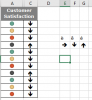
I would like help with conditional formatting. I need arrow icons to point up, down or sideways based on the value entered in the cell with conditional formatting, and how it relates to the value in an adjacent cell.

For example, if cell A1 contains 2, and cell B1 contains 1, then I want an arrow icon in cell B1 to point Up (for this exercise, lower numerical values are better than higher ones. So, 1 is better than 2, and moving from 2 to 1, would signify an improvement, and thus, an up arrow).

Please see attachment for a sample of data.

Thank you!
Carlos
 

Attachments

Hi Carlos Ruano,
Conditional formatting with Icons does not like relative references in formulas.
You can achieve though the same with a formula and hide the B-column.
=IF(B2>A2,"ê","é"), but you use the wingdings font.
In case of equal values you can nest a second if and use the "è" to have a narrow that points to the right.
Look in the option insert symbol: this gives you tones of possibilities to create "custom" conditional formats.
upload_2018-1-19_19-10-2.png
 

Attachments

Last edited:
Hi Carlos Ruano,
Conditional formatting with Icons does not like relative references in formulas.
You can achieve though the same with a formula and hide the B-column.
=IF(B2>A2,"ê","é"), but you use the wingdings font.
In case of equal values you can nest a second if and use the "è" to have a narrow that points to the right.
Look in the option insert symbol: this gives you tones of possibilities to create "custom" conditional formats.
View attachment 49053

Hi GraH - Guido,

Thank you for your post. What you wrote is what I feared. I did not think that what I asked for was possible. I think your alternate solution makes sense, and will be easy to do. I just hope that the big wigs in my company are ok with that solution!

Thanks!
Carlos
 
Hi GraH - Guido,

Thank you for your post. What you wrote is what I feared. I did not think that what I asked for was possible. I think your alternate solution makes sense, and will be easy to do. I just hope that the big wigs in my company are ok with that solution!

Thanks!
Carlos
Good luck with the bosses :-). Alternative here: https://chandoo.org/wp/2017/12/05/conditional-formatting-top-tips/ But also requires a formula. Now you can shift the helper column out of sight. Either way, the final result is what is required: arrows pointing up/down.
 
Back
Top