

You are using an out of date browser. It may not display this or other websites correctly.
You should upgrade or use an alternative browser.
You should upgrade or use an alternative browser.
Conditional formatting help
- Thread starter Max Alejandro Molina
- Start date
NARAYANK991
Excel Ninja

Khalid NGO
Excel Ninja
Hi Max,
Alternatively you can use excel's built-en options:
e.g. for Range: 1 to 30
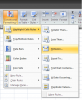
Set format to your choice.
Do this again with different format for 31 to 60
Set different format.
and similarly there are more options for Equal to...
and
Greater than...
Less than...
Regards,
Alternatively you can use excel's built-en options:
e.g. for Range: 1 to 30
Set format to your choice.
Do this again with different format for 31 to 60
Set different format.
and similarly there are more options for Equal to...
and
Greater than...
Less than...
Regards,

sudipto3003
Member
hi Khalid,
Narayan have used the same option you have mentioned....
Narayan have used the same option you have mentioned....
Khalid NGO
Excel Ninja
Hi,hi Khalid,
Narayan have used the same option you have mentioned....
No, if you go through Manage CF Rules you will see that Narayan Sir used formulas like:
=AND($E1>30,$E1<=60)
=AND($E1>0,$E1<=30)
=$E1=0
And I've used built-in options for the same...
Regards,
Max Alejandro Molina
Member
Thank you all for the help! I have noticed that when I sort the numbers from bigger to lower or backwards, this conditional formating does not work properly do you guys have any comment to this issue?
NARAYANK991
Excel Ninja
Hi ,
I tried it and there is no problem. Everything is colored as it was before , and according to the rules.
Narayan
I tried it and there is no problem. Everything is colored as it was before , and according to the rules.
Narayan