Hi Guys,
I have a problem which seems rather easy, however I can't arrive at the solution.
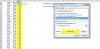
Suppose you have two cols. Column A contains around 3000 names. And corresponding to every name, you have a certain value assigned which is in column B.
Now, I sort column B in descending order. I now want to add up the values in Col. B to figure out which rows make up 70% of the total value.
Suppose i see that the range (B2:B976) represents 70% of the total value.
Then I would like to add up this range (B2:B976) to find out the exact value.
The 70% value should be in a cell so that i can keep changing the number as per my convenience to probably 80% or 50% etc.
Is there a simple way to do this?
Thanks in advance!
I have a problem which seems rather easy, however I can't arrive at the solution.
Suppose you have two cols. Column A contains around 3000 names. And corresponding to every name, you have a certain value assigned which is in column B.
Now, I sort column B in descending order. I now want to add up the values in Col. B to figure out which rows make up 70% of the total value.
Suppose i see that the range (B2:B976) represents 70% of the total value.
Then I would like to add up this range (B2:B976) to find out the exact value.
The 70% value should be in a cell so that i can keep changing the number as per my convenience to probably 80% or 50% etc.
Is there a simple way to do this?
Thanks in advance!