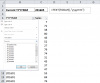
PP3321 Active Member May 24, 2016 #1 I want to filter my Table automatically. Cell C2 contains the current month. I want to like C2 with the table & display only the current month rows. Is it possible without using VBA Macro...?
I want to filter my Table automatically. Cell C2 contains the current month. I want to like C2 with the table & display only the current month rows. Is it possible without using VBA Macro...?
N NARAYANK991 Excel Ninja May 24, 2016 #2 Hi , Can you clarify what is meant by the following : I want to filter my Table automatically. Click to expand... Narayan
Hi , Can you clarify what is meant by the following : I want to filter my Table automatically. Click to expand... Narayan
PP3321 Active Member May 24, 2016 #3 Hi Narayan Thank you for your question. If the current month is May, when opening the workbook, I want the table to automatically filter by May. I know I can do it by Macro. But I wonder if we can do it without using Macro...
Hi Narayan Thank you for your question. If the current month is May, when opening the workbook, I want the table to automatically filter by May. I know I can do it by Macro. But I wonder if we can do it without using Macro...
N NARAYANK991 Excel Ninja May 24, 2016 #4 Hi , It is not possible , unless you use this workaround : http://ww2.cfo.com/technology/2011/07/spreadsheets-filtering-a-pivot-table-with-a-formula/ So include a column in your data set which evaluates to TRUE / FALSE based on whether it is the current month or not. You will need to refresh the pivot table manually to get the result. Narayan
Hi , It is not possible , unless you use this workaround : http://ww2.cfo.com/technology/2011/07/spreadsheets-filtering-a-pivot-table-with-a-formula/ So include a column in your data set which evaluates to TRUE / FALSE based on whether it is the current month or not. You will need to refresh the pivot table manually to get the result. Narayan